Chapters:
- >> Overview
- >> Definitions
- >> Equations
Chapter 1. Overview
1.1. Drug Dosing Calculator Overview
Axion’s Drug Dosing Calculator calculates the concentrations and volumes needed to prepare dosing solutions for plate-based experiments.
1.2. Stock Solution Conditions
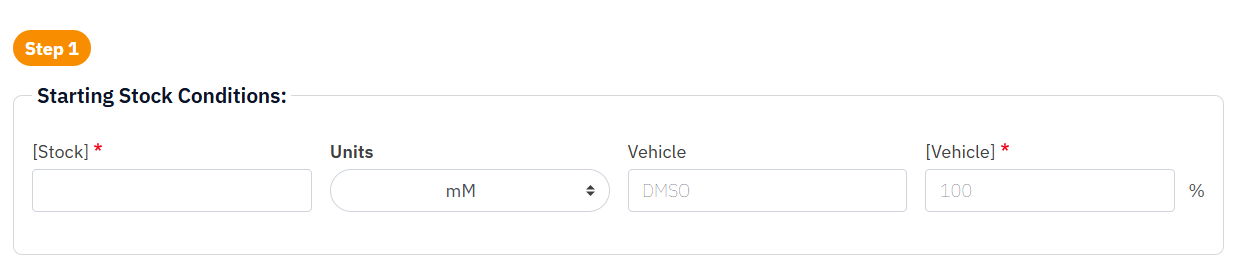
- Enter your concentrated stock solution (Stock) and the vehicle concentration in the stock solution (Vehicle).
- 1.1 Ensure proper units are selected using the dropdown option.
- 1.2 For example, a compound prepared in all DMSO would typically need to be entered as 100% DMSO.
1.3. Target Dose Conditions
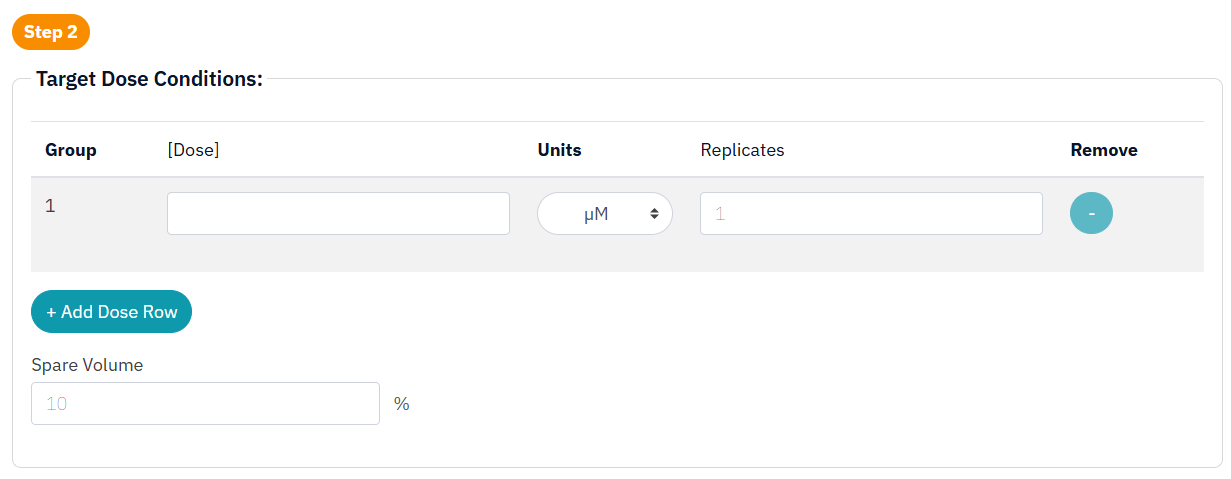
- Enter your target cell plating density in the Cells per Well field, as well as the cell plating volume (Vplating) and number of wells to be plated.
- Multiple plating densities may be added or removed with the plus and minus buttons.
- 2.1 Note: Order the list of dosage concentrations with proper units from highest to lowest.
- 2.2 Additionally, Spare Volume provides room to account for extra solution in each aliquot due to pipetting loss or dead volume.
1.4. Well Conditions
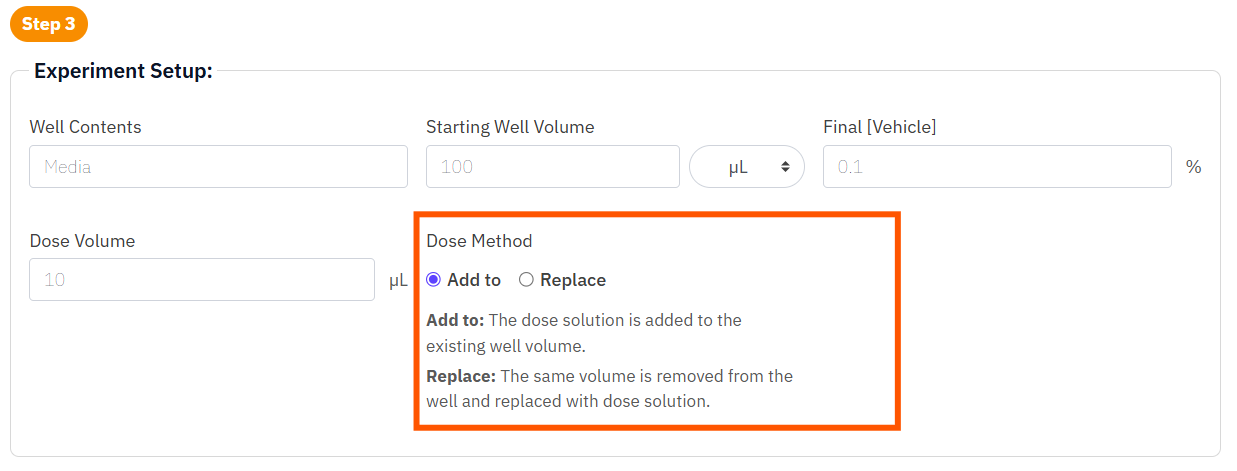
- Enter your well-starting solution volume (Starting Well Volume) and the % of desired final vehicle concentration into Final [Vehicle].
- 1.1.Dose Volume represents the volume of drug solution added to the well.
- To add to the initial volume or replace an equivalent amount of volume with dose solution, click on Add To or Replace respectively.
1.5. Solution Results
Then, click Calculate Results. The following outputs are provided:
- Product identifies the solution being prepared.
- [Conc] provides the target concentration of the product.
- Solution identifies the source solution used to prepare the product.
- Vsolution provides the required volume of the source solution.
- 4.1 It is rounded to the nearest 0.1 µL and is not allowed to be less than 10 µL. Vdiluent is adjusted accordingly.
- Diluent identifies the diluent used to prepare the product.
- Vdiluent provides the required volume of diluent.
For each solution (Product) you need to make, add Vdiluent to Vsolution slowly, mixing as needed.
- Note: Adding Vsolution to Vdiluent may cause solubility issues. Always dilute high to low.
- Note: The starting stock or vehicle concentration is considered too low if the desired final vehicle concentration cannot be achieved.

Chapter 2. Definitions
2.1. Starting Conditions
Stock Solution Conditions
| [Stock] | Concentration of the stock solution |
| Vehicle | Vehicle control |
| [Vehicle] | Concentration of the vehicle in the stock solution |
2.2. Target Conditions
Target Dose Conditions
| [Dose] | Final concentration in the well |
| Replicates | Number of wells to receive the dose |
| Spare Volume | Percentage of overfill each aliquot will get to avoid running short. |
2.3. Well Conditions
Experiment Setup
| Well Contents | Solution or medium present in the well before dosing |
| Starting Well Volume | Volume of solution or medium present in each well before dosing |
| [Vehicle] | Final concentration of the vehicle in percent |
| Dose Volume | Volume of drug solution added to the well |
| Dose Method | Method of dose addition |
2.4.Results
Results
| Product | The final solution being prepared |
| [Conc] | Final concentration of the solution being prepared |
| Vsolution | Required volume of the source solution |
| Solution | Source solution used to prepare the product |
| Vdiluent | Required volume of diluent |
| Diluent | Diluent used to prepare the product |
Chapter 3. Equations
3.1. Solution Design
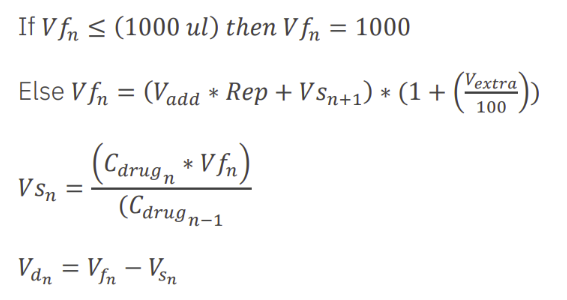
Solution Design Calculations:
(n = number of drug solutions or length of the array)
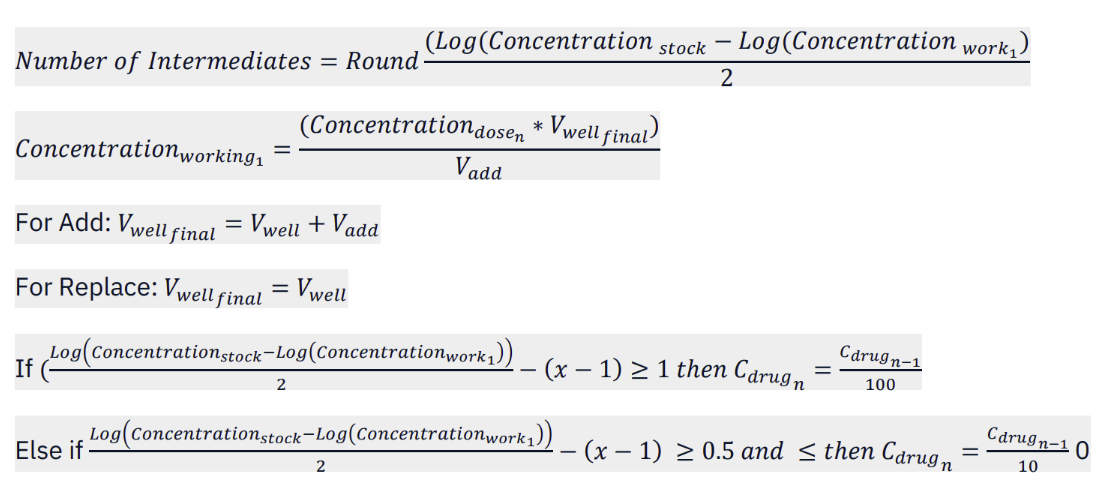
Volume Calculations:
For working solutions:

For intermediates:
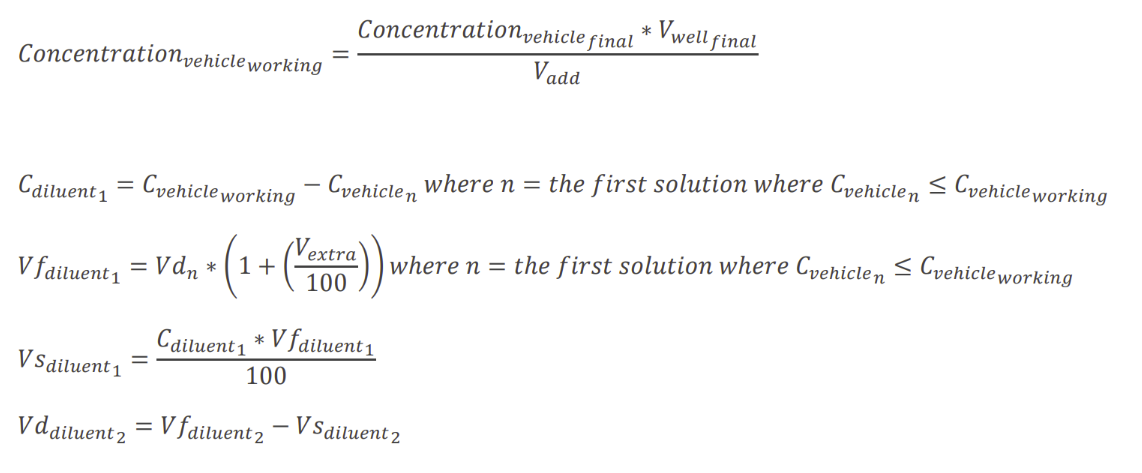
Vehicle & Diluent Preparation Calculations: